Stop typing in every currency pair by hand
Managing foreign exchange rates in a global organization is often a repetitive, error-prone task. Finance teams routinely spend hours entering rates for every currency combination — USD to EUR, GBP to JPY, and every other pair they trade in. Oracle E-Business Suite has a feature built to remove that work entirely: Pivot, Contra and Cross Currency setup.
The problem: the manual data entry burden
If your organization deals with multiple currencies, maintaining a rate for every possible pair does not scale. Each additional currency multiplies the number of combinations you have to enter and check. That consumes time your finance team could spend elsewhere, and every manual entry is a chance for a calculation error to slip into your financial reporting.
The solution: the "Pivot" strategy
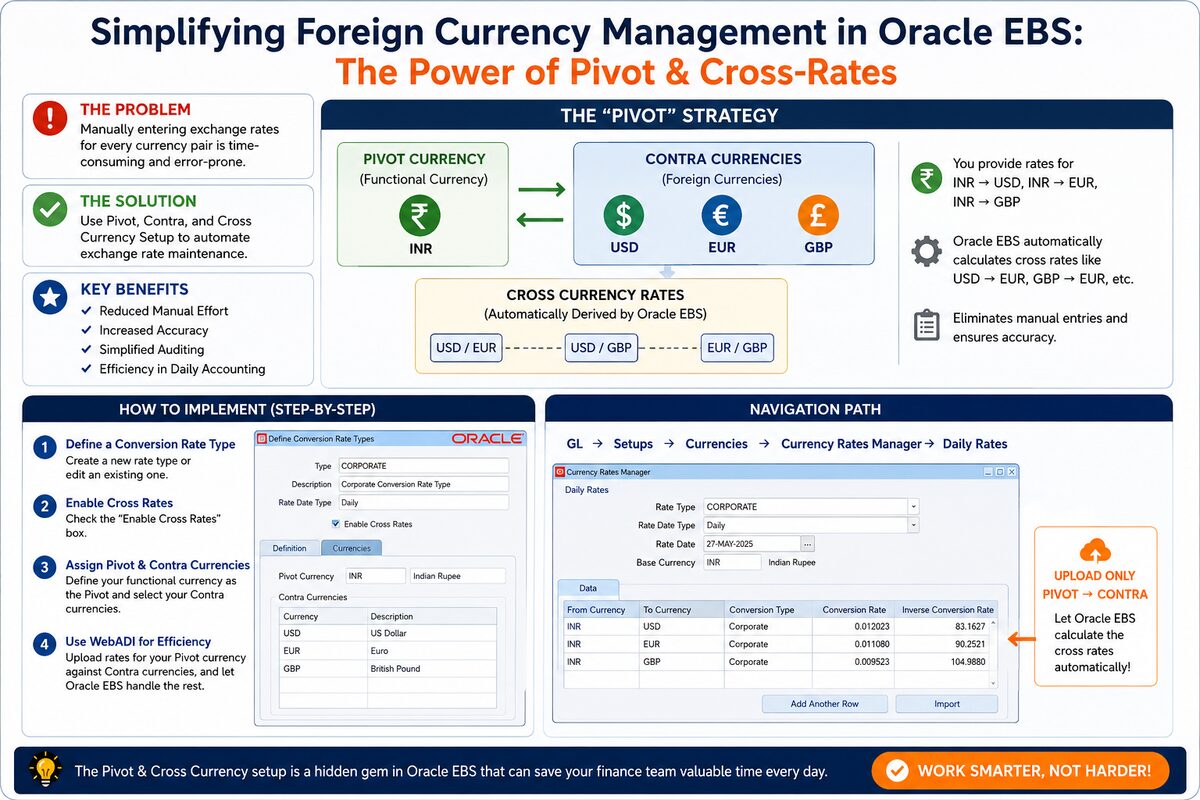
Instead of maintaining a rate for every combination, you configure Oracle EBS to treat your functional currency as a pivot point. Every other currency is entered only against the pivot — Oracle derives the rest.
- Pivot currency — your functional or primary currency (for example, INR).
- Contra currencies — the foreign currencies you actually trade in (for example, USD, EUR, GBP).
- Cross currency rates — rates the system derives automatically. Enter INR → USD and INR → EUR, and Oracle EBS calculates USD → EUR for you.
You upload rates for one currency — your pivot — against each contra currency. Every cross-rate between contra currencies is computed, not typed.
How to implement it, step by step
Configure this under: General Ledger → Setup → Currencies → Rates → Types
| Step | What to do |
|---|---|
| 1. Define a conversion rate type | Create a new rate type, or edit an existing one, in the Rates Types setup. |
| 2. Enable cross rates | Check the "Enable Cross Rates" box on that rate type. |
| 3. Assign pivot & contra currencies | Set your functional currency as the pivot, and select every currency you trade in as a contra currency. |
| 4. Load rates with WebADI | Use the Currency Rates Manager (Daily Rates) with WebADI. Upload rates for the pivot currency against each contra currency, and let Oracle EBS calculate the rest. |
Navigation path: General Ledger → Setups → Currencies → Currency Rates Manager → Daily Rates.
Key benefits
- Reduced manual effort — you only upload rates for your functional currency against each contra currency, not every pair.
- Increased accuracy — cross-rates are calculated by the system, which removes manual math errors from the process.
- Simplified auditing — fewer rate records to reconcile makes month-end review and audit checks faster.
- Day-to-day efficiency — daily rate maintenance becomes a single upload instead of a data entry exercise across every currency pair.
The summary
Pivot and Cross Currency setup is a feature that already exists in Oracle EBS General Ledger, but it goes unused in a lot of implementations. If your team is still keying in a rate for every currency pair by hand, the fix is a configuration change, not a project — enable cross rates, assign your pivot and contra currencies, and let the system do the arithmetic.
This article is part of the ROSTAN Oracle Knowledge Hub — our engineering guidance on Oracle EBS, Fusion Cloud, APEX, Database 23ai and OCI, organised by topic.