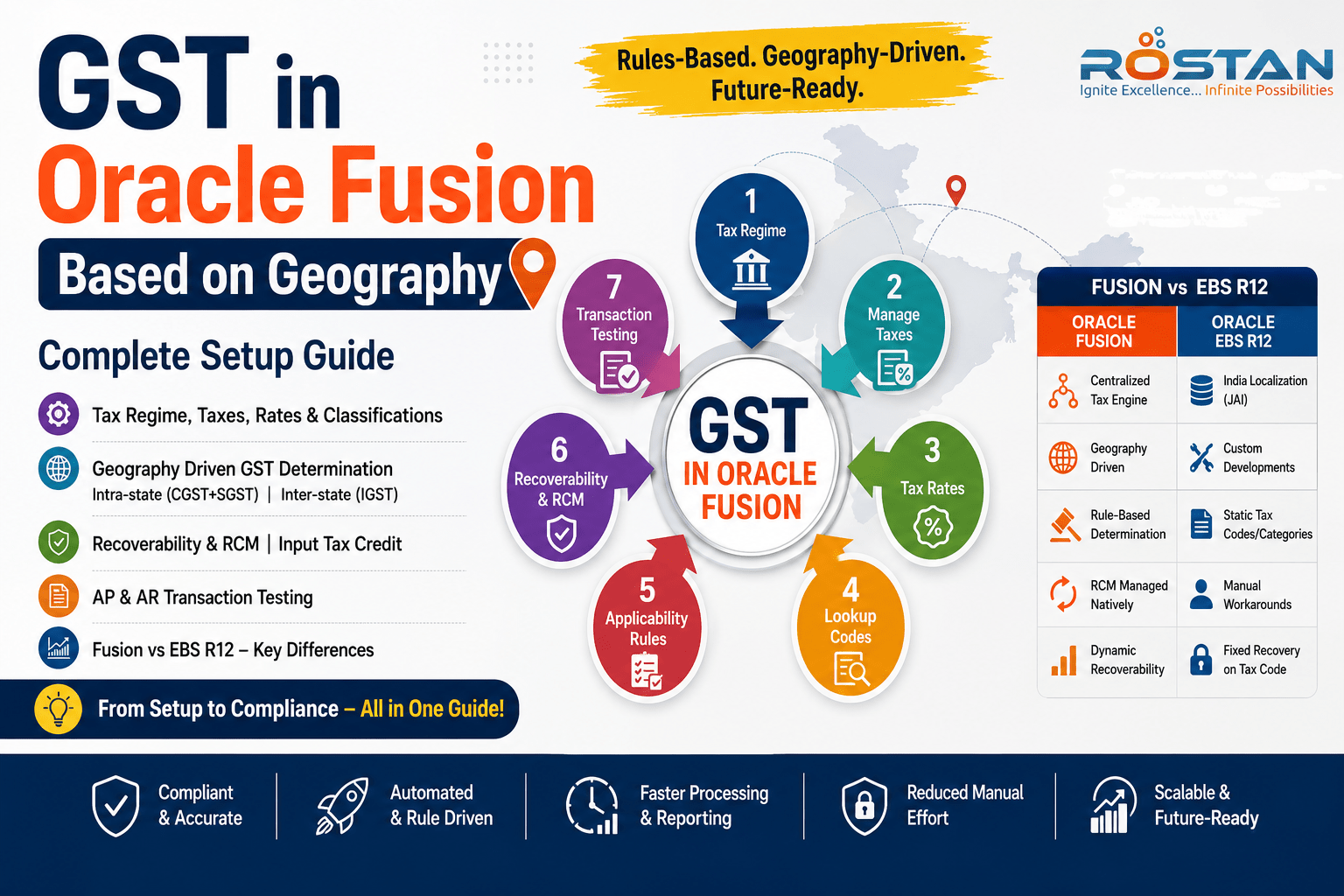
Setup steps, screen by screen, with the EBS R12 equivalent at each stage
Configuring GST in Oracle EBS R12 and Oracle Fusion Cloud is not the same job with a new screen skin — the underlying tax engine philosophy is different. This walkthrough goes step by step through a real Fusion GST setup (Tax Regime through Reverse Charge Mechanism) and shows exactly where the EBS R12 approach diverges at each stage.
Every screen, every rule, all 8 stages — GST in Oracle Fusion, Geography-Based
1. Tax Regime: One Regime for the Whole Country
A single country-level tax regime, GST_INR, is created for India — Regime Level = Country, Start Date 1-Jul-2017. Configuration options are then assigned to the relevant legal entity and business unit with "Common configuration with party overrides," so every entity shares the same base setup but can still override specific rules where it genuinely needs to.
In EBS R12 India Localization, this didn't exist as a single flow. GST postdates most R12 India Localization builds, so tax setups were typically maintained through separate Excise, VAT, CST and Service Tax regimes with Org/Location-level registrations — several parallel structures instead of one.
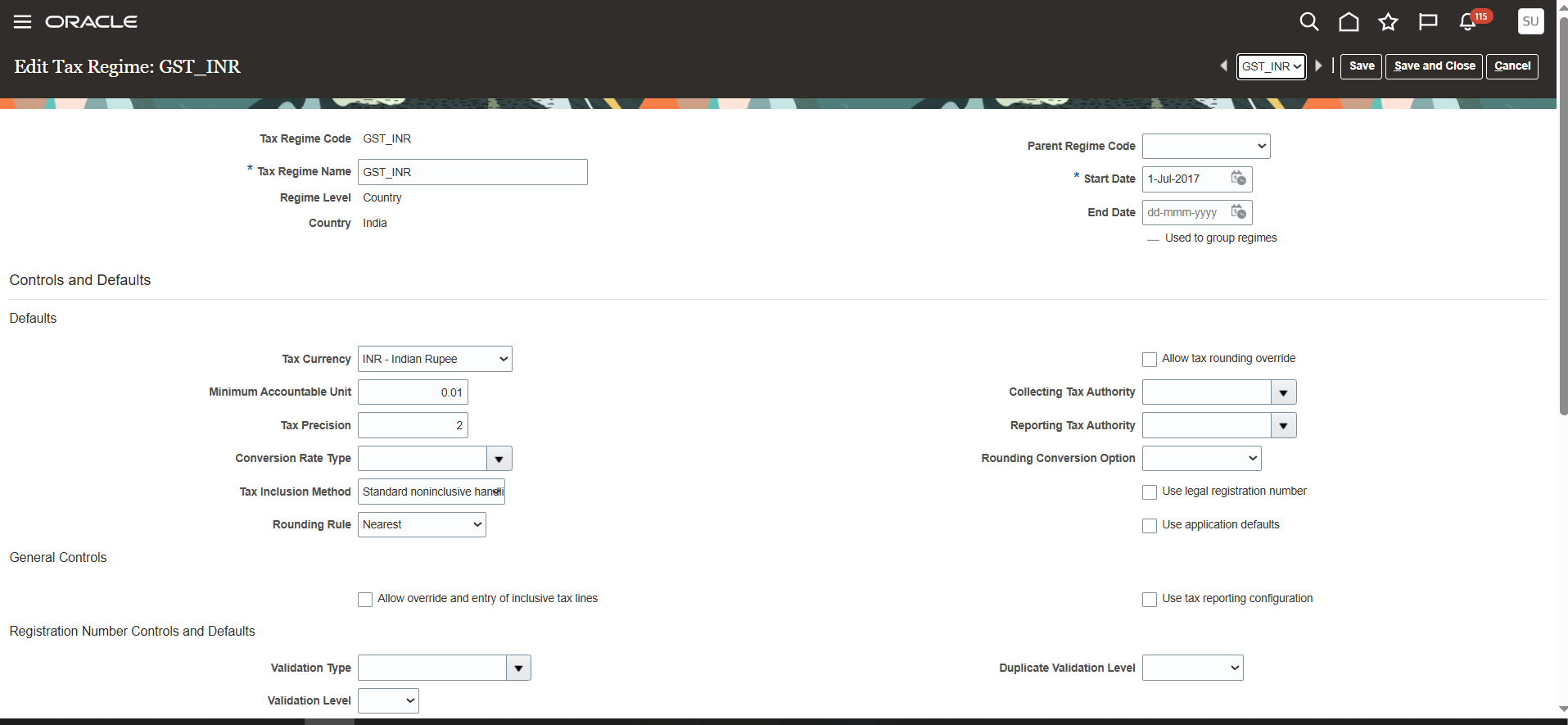
Edit Tax Regime: GST_INR — header, dates, and defaults
2. Manage Tax: CGST, SGST, IGST and Export as One Family
Under GST_INR, individual taxes are created for each GST component — CGST_INR, SGST_INR, IGST_INR and IGST_EXPORT. The geography-driven field sits on the tax itself: Geography Type = COUNTRY, Parent Geography Name = India, Tax Point Basis = Delivery, and Tax Registration default = "Bill-from party." Recoverable and Liability GL accounts are then assigned per ledger under Tax Accounts.
R12 India Localization used tax types and regimes per statutory levy, with separate localization tables (JAI_*) rather than the standard e-Business Tax record structure — account determination relied on localization-specific setups instead of a standard Tax Accounts tab.
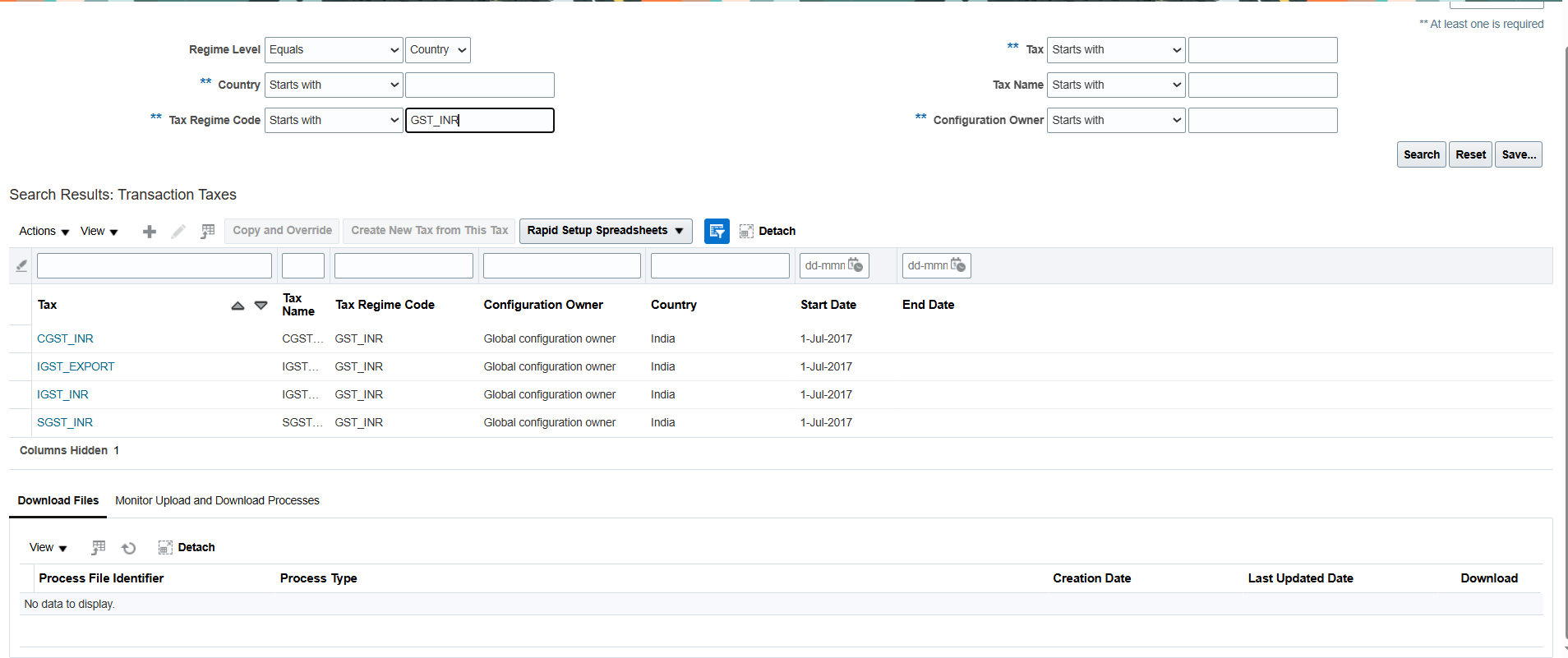
Manage Tax — CGST_INR, IGST_EXPORT, IGST_INR, SGST_INR created under GST_INR
3. Tax Rates: Versioned Slabs, Not One-Off Codes
Tax rate codes are created under each tax — for example IGST_INR 18% and IGST_INR 5%, effective 1-Jul-2017. Each rate period holds the percentage and can carry its own accounts and reporting codes, and rate changes over time are tracked automatically as new rate periods rather than as new codes.
R12 typically held tax rates against Tax Codes or Categories tied to Item classification, so a rate change generally meant a new tax code or a date-tracked category update rather than a rate-period history on a single rate record.
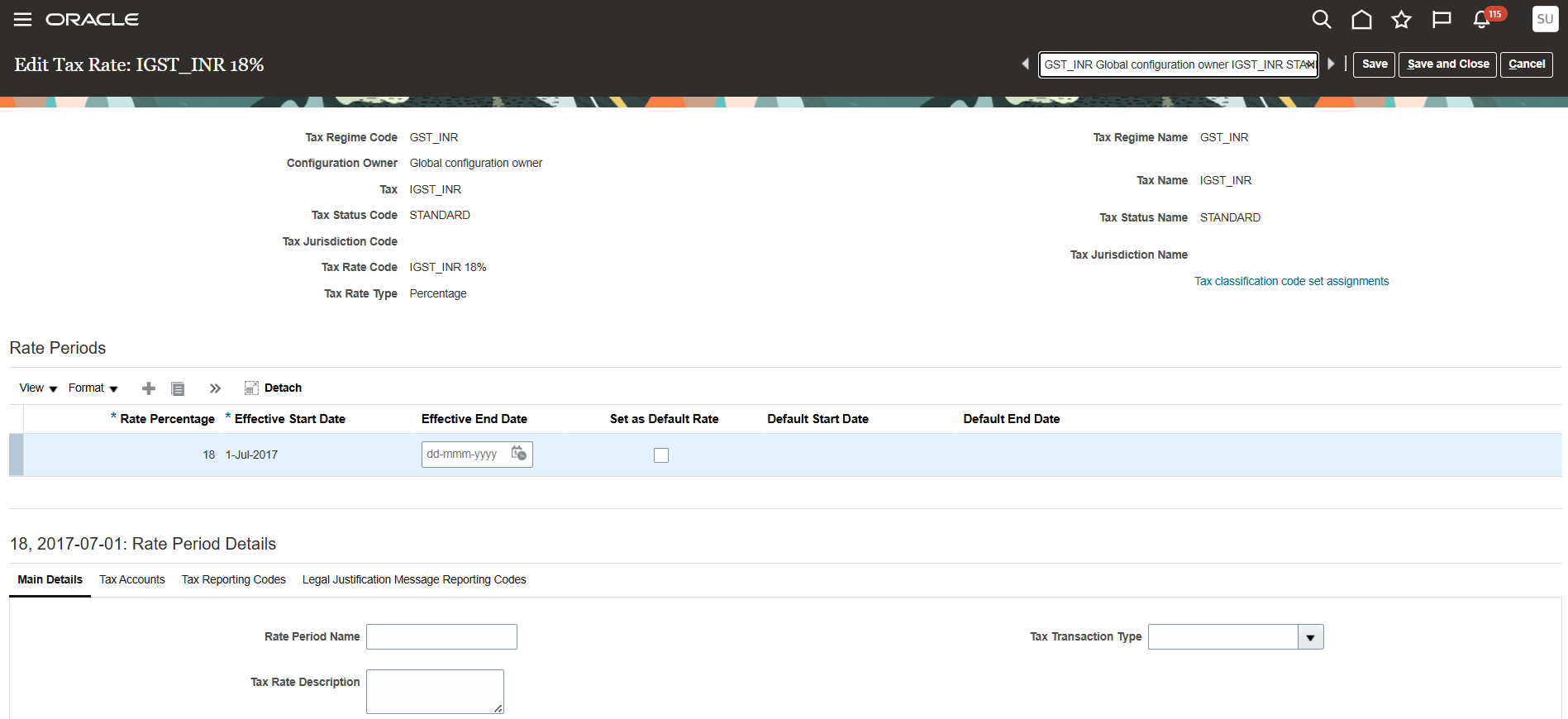
Edit Tax Rate: IGST_INR 18% — rate period effective 1-Jul-2017
4. Classification Lookups: One Code, Shared by AP and AR
Lookup codes such as GST_INR 5% and GST_INR 18% are defined under two lookup types: ZX_OUTPUT_CLASSIFICATIONS (used for Order-to-Cash / AR transactions) and ZX_INPUT_CLASSIFICATIONS (used for Procure-to-Pay / AP transactions). These are what a user, or a default, selects on a transaction line, and they feed the tax determination rules as a "Transaction Input Factor."
R12 India Localization generally drove tax defaulting from Item Classification, Tax Category, or Supplier/Customer Additional Information — not a lightweight, shared lookup code referenced identically by both O2C and P2P.
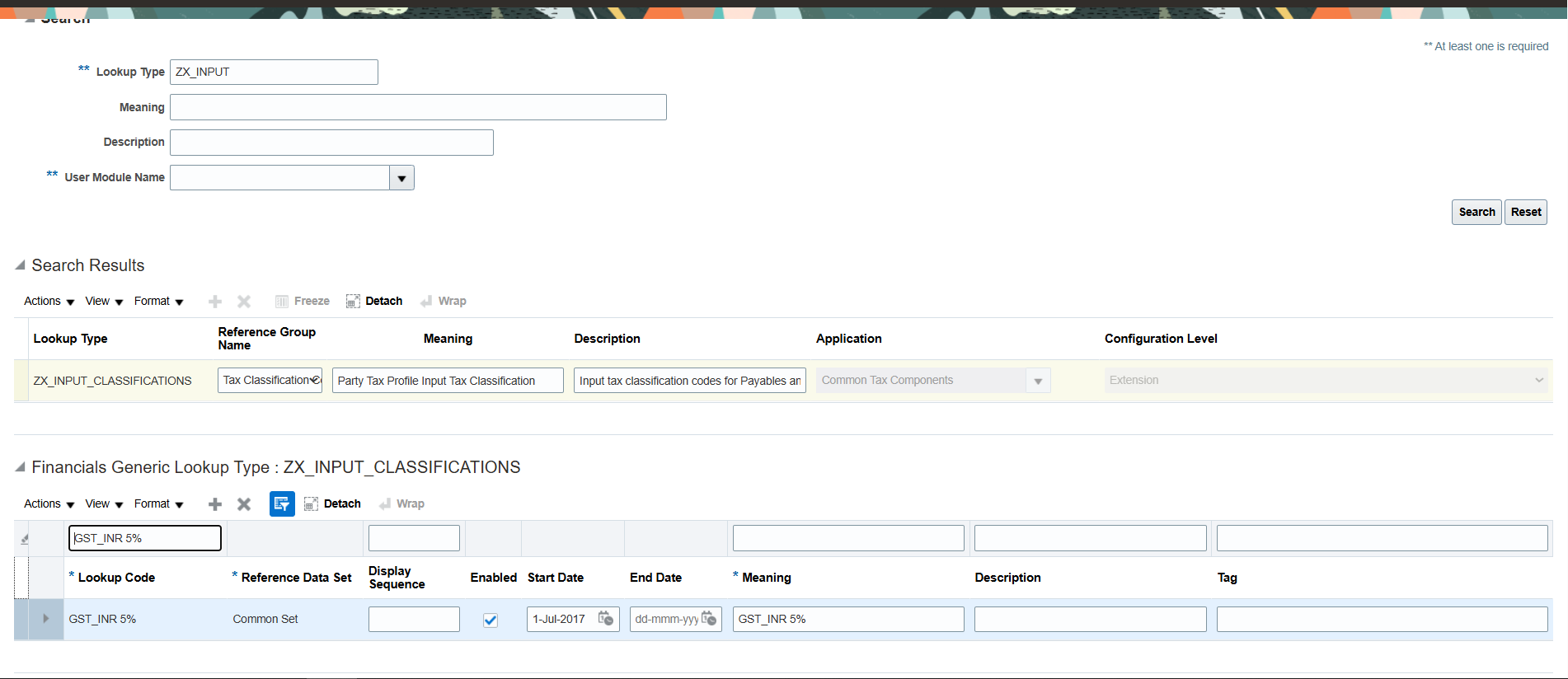
ZX_INPUT_CLASSIFICATIONS lookup — GST_INR 5% code defined for P2P
5. Applicability Rule: Geography Decides IGST vs. CGST+SGST
The rule IGST_INR_GEO_APPL ("Determine Tax Applicability Rules") uses two determining factors: Geography — Bill-from State, and Transaction Input Factor — Tax Classification Code. The tax condition set evaluates Bill-from State "Not equal to" Bill-to State — i.e. an interstate movement — combined with the classification code, and returns "Applicable." This is the core logic that decides whether IGST, rather than CGST+SGST, applies to a transaction, purely from comparing Bill-from and Bill-to state. No manual tax code selection is required on the transaction.
In R12, interstate vs. intrastate determination for GST-like scenarios needed custom PL/SQL, Tax Category derivation rules, or bolt-on GST patches — the standard R12 India-build EBTax engine did not ship an out-of-the-box "compare ship-from state to ship-to state" geography condition.
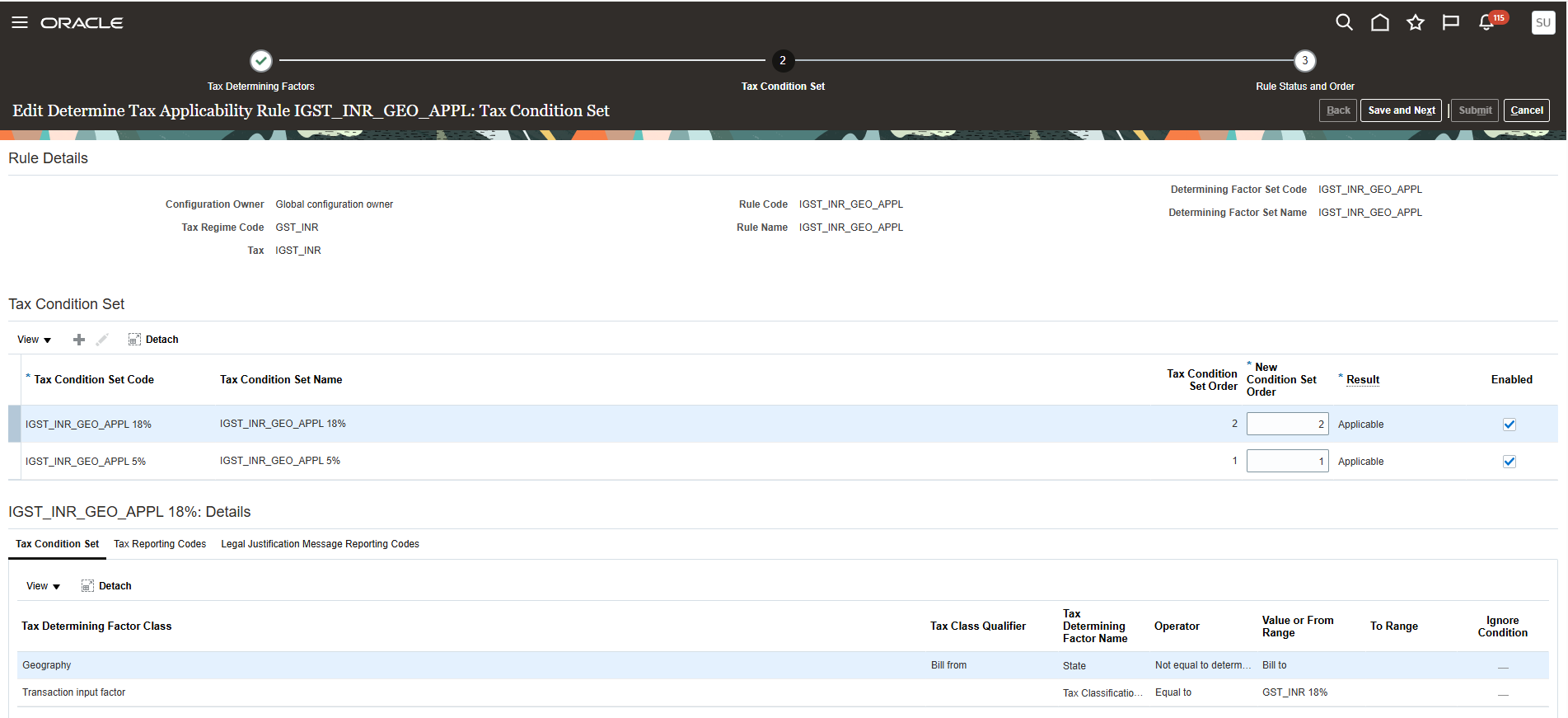
Tax Condition Set — Bill-from State not equal to Bill-to State, combined with classification code, result: Applicable
6. Rate Determination Rule: Picking the Right Slab
The rule IGST_INR_GEO_RATE ("Edit Direct Rate Determination Rules") reuses the same two factors — Bill-from State and Tax Classification Code. Each condition set (for example, "Bill-from State not equal to Bill-to State" plus "Classification Code = GST_INR 18%") maps to a specific Tax Rate Result, such as IGST_INR 18%. This rule sits in the overall evaluation order alongside IGST_INR_IB_RATE and IGST_INR_RATE, so Fusion picks the correct slab automatically once applicability is established.
R12 usually resolved the rate directly from the selected Tax Code or Category at the line — applicability and rate selection were largely the same static setup, not two distinct, separately evaluated rule types.
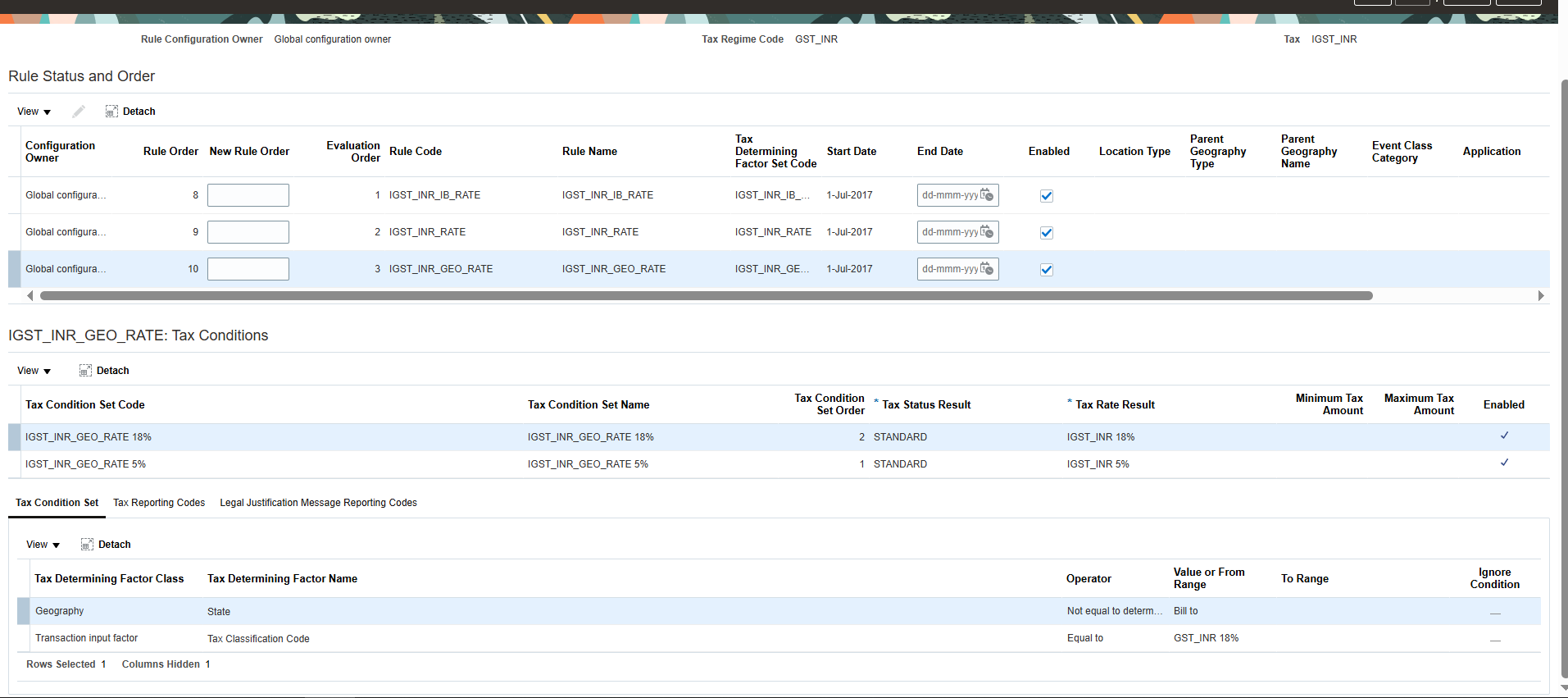
Tax Condition Set — geography + classification code mapped to Tax Rate Result IGST_INR 18%
7. Recoverability Rule: Recovery Rate That Can Change Per Transaction
The rule IGST_INR_NONREC ("Determine Recovery Rate Rules") uses a single Transaction Input Factor — Intended Use. When Intended Use = "NO," the condition set returns a Tax Rate Result of IGST_INR 0% (recovery rate 0%, non-recoverable). Where that condition isn't met, the tax defaults to its Primary Recovery Type of RECOVERABLE (100%), set once at the tax level.
R12 typically held recovery or non-recovery as a static attribute of the Tax Code — a Recoverable/Non-Recoverable flag set once at configuration time, with no rule engine to dynamically evaluate a transaction attribute and switch the recovery percentage per transaction.
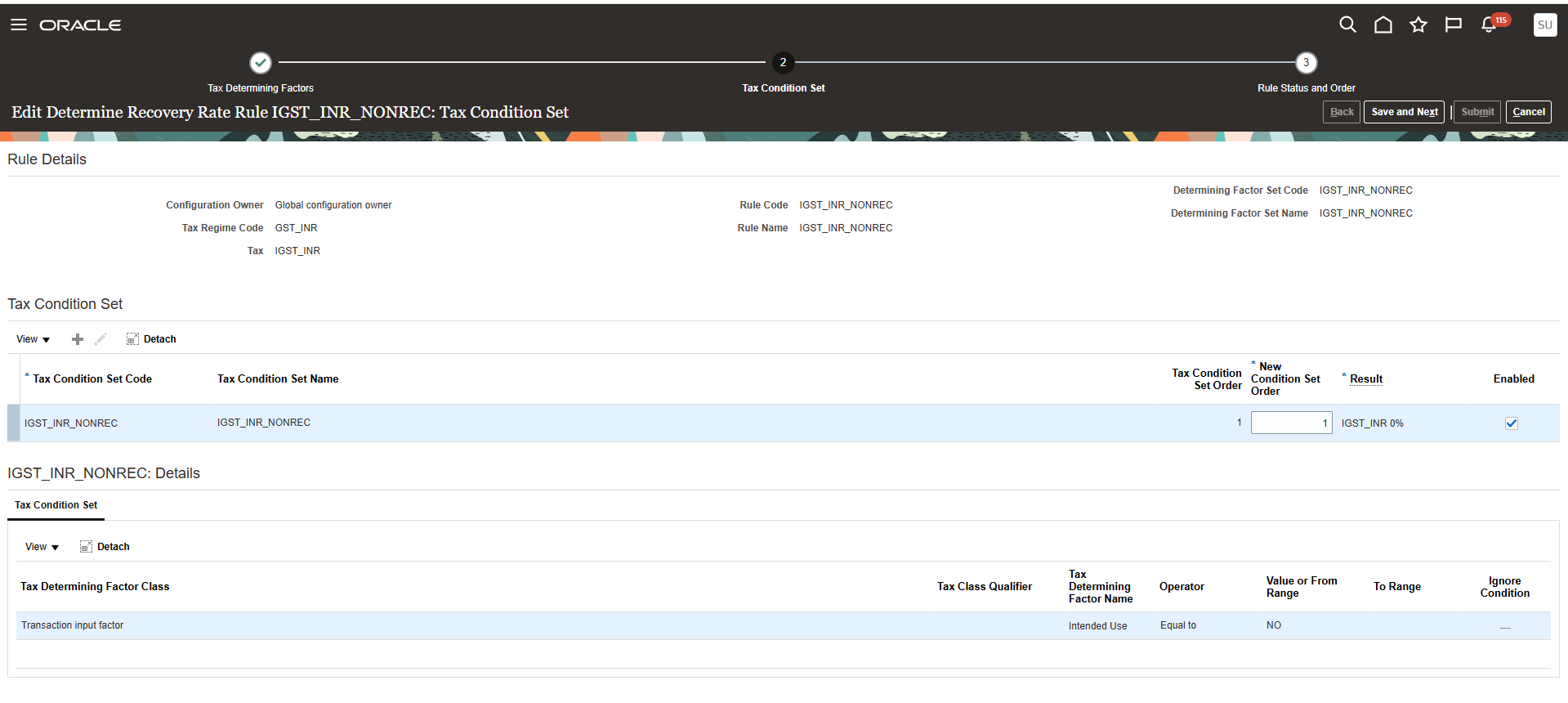
Tax Condition Set — Intended Use equal to NO, result: IGST_INR 0%
8. Reverse Charge Mechanism: Native, Not a Workaround
The rule IGST_RCM_INR ("Determine Tax Registration Rules") uses Registration — Bill-from party as its factor. When the supplier's Registration Status = "NOT REGISTERED," the rule switches the applicable registration to the "First-party tax registration number" — the transaction is treated as self-assessed by the buyer under Reverse Charge, exactly as GST requires for supplies from unregistered dealers.
RCM is a GST-era concept that didn't exist in classic R12 e-Business Tax. R12 India Localization, which predates GST, had no equivalent native rule, so RCM-style self-assessed liability typically required manual journal entries or custom workarounds.
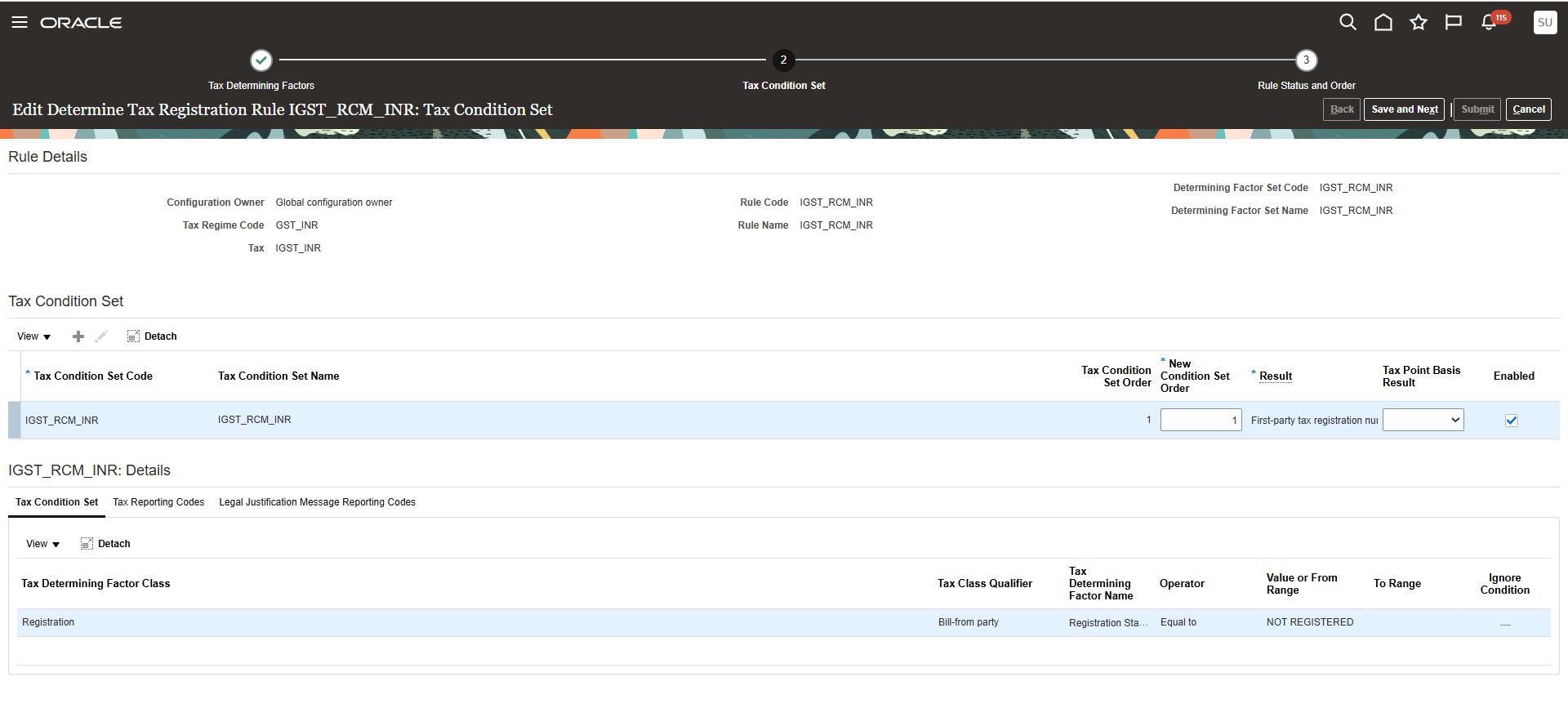
Tax Condition Set — Bill-from party Registration Status equal to NOT REGISTERED, result: First-party tax registration
Key Architectural Differences vs. EBS R12
| Fusion Setup Step | What It Does | Difference from EBS R12 |
|---|---|---|
| Create Tax Regime (GST_INR) | One regime represents the entire GST law for the country. | R12 India Localization maintained separate Excise/VAT/Service Tax regimes rather than one unified country regime. |
| Manage Tax (CGST/SGST/IGST/Export) | Each GST component is its own Tax record under the common regime. | R12 used localization tables (JAI_*) per levy instead of the standard EBTax tax record structure. |
| Define Tax Rates | Slab-wise rates as versioned rate periods, tracked automatically. | R12 held rates against Tax Codes/Categories on the Item master; changes needed new codes. |
| Tax Classification Lookups | One shared code per rate slab, referenced by both AP and AR. | R12 drove defaulting from Item Classification or Supplier/Customer setup, separately per flow. |
| Applicability Rule (Geography) | Compares Bill-from and Bill-to State to decide IGST vs. CGST+SGST automatically. | R12 needed custom PL/SQL or bolt-on patches to replicate this comparison. |
| Direct Rate Determination Rule | Selects the correct rate slab once applicability is established. | R12 resolved rate and applicability from the same static Tax Code/Category setup. |
| Determine Recovery Rate Rule | Recovery percentage can flex per transaction via Intended Use. | R12 held recovery as a fixed Tax Code attribute, set once at configuration time. |
| Determine Tax Registration Rule (RCM) | Automatically flips liability to the buyer when the supplier is unregistered. | RCM is GST-era; R12 (pre-GST) had no native equivalent, requiring manual journals. |
Put together, six structural shifts separate the two platforms: a unified regime instead of siloed per-levy regimes; a native geography engine instead of custom state-comparison code; rule-based, condition-driven setup instead of static Tax Code defaulting; native RCM support instead of manual workarounds; dynamic recoverability instead of a fixed Tax Code attribute; and shared classification codes across O2C and P2P instead of two separately maintained defaulting paths.
Deciding whether to migrate? This post covers how the Fusion tax engine is built. For the platform-level business case — TCO, patch delivery, e-invoice integration and GSTR sequencing — see Oracle Fusion vs. EBS R12: GST India Comparison.
GST setup is only half the compliance picture. See GST + Ind AS Compliance Architecture in Oracle Fusion for why e-invoicing and lease/revenue accounting treatment should be one coordinated build, not two separately scoped projects.
New to Fusion's GST journey? See India GST in Oracle Fusion Cloud: History & Architecture for how the platform evolved from the 2017 rollout to today.