Odoo ERP Implementation Guide for India: Modules, Cost & Timeline (2026)

Odoo ERP Implementation Guide for India: Modules, Cost & Timeline (2026)

  • By ROSTAN Technologies Consulting Team
  • Published Jun 05, 2026
  • Share This:

What Does an Odoo ERP Implementation Involve in India?

An Odoo implementation has four parts: choosing the right modules and edition, configuring them to your processes, migrating your data, and integrating compliance (GST e-invoicing) and third-party systems. Cost and timeline depend on the number of modules, customisation, and deployment model — not a fixed rate. A focused, few-module rollout goes live faster and cheaper than a full multi-module, heavily customised enterprise deployment.
Step 1: Choose Modules and Edition

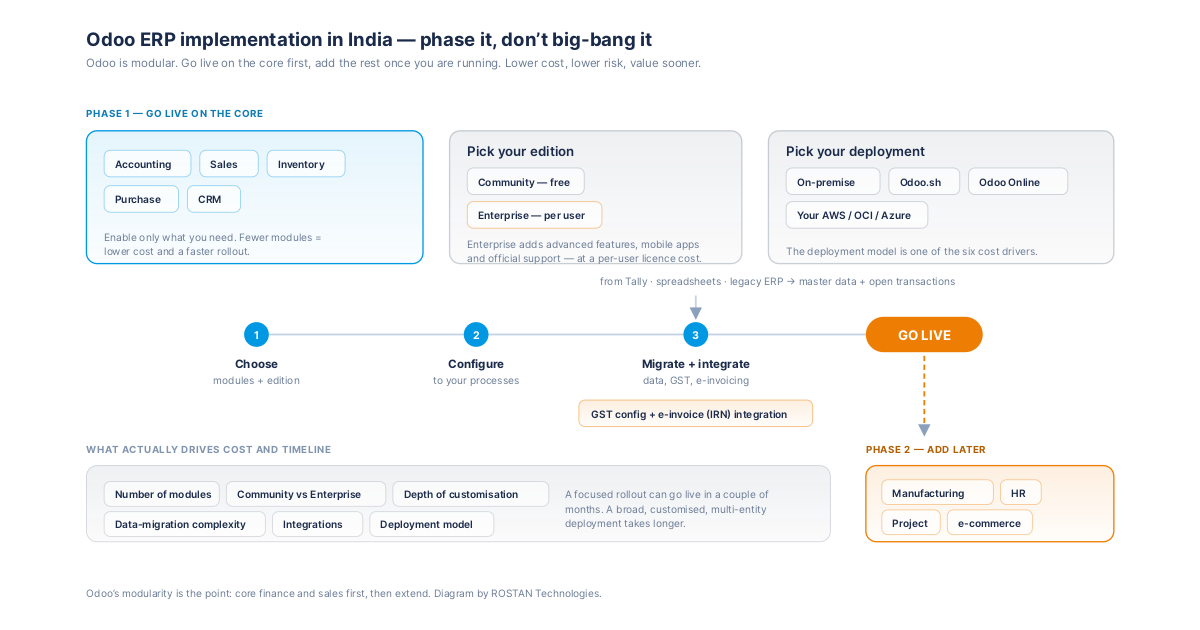
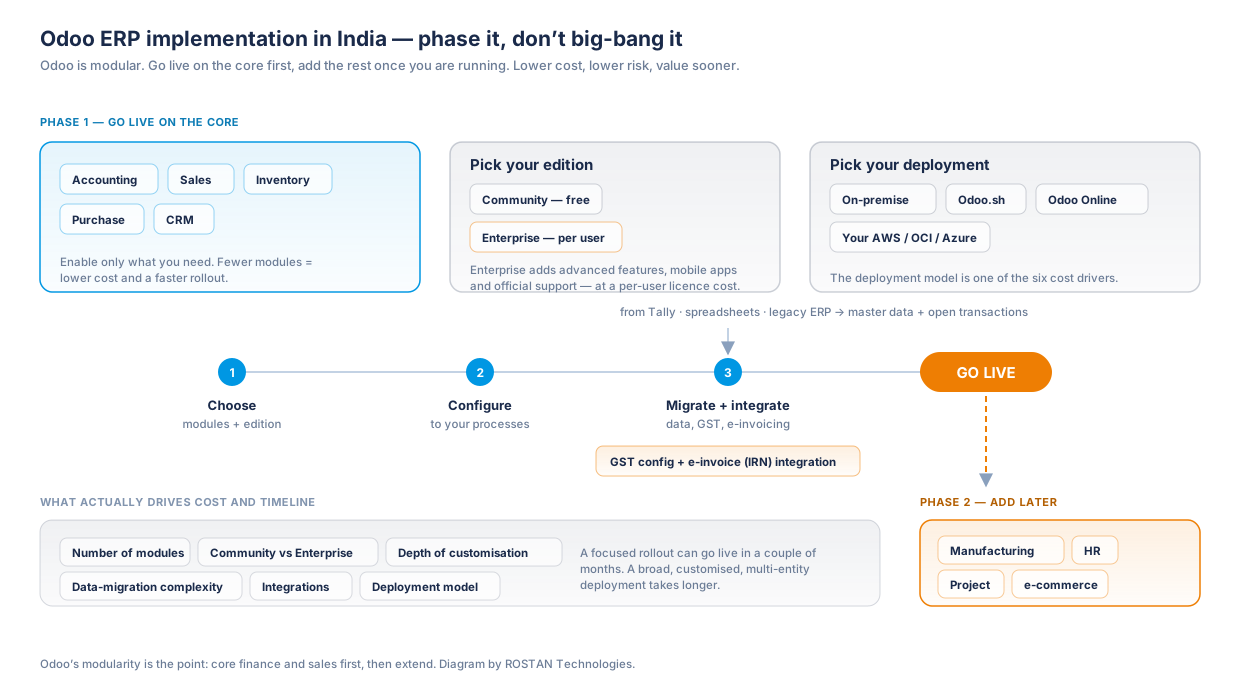
Odoo is modular — you enable only what you need. Common starting modules are Accounting, Sales, Inventory, Purchase, and CRM, with Manufacturing (MRP), HR, Project, and e-commerce added as required. You also choose between Odoo Community (free, open-source core) and Odoo Enterprise (paid, with advanced features, mobile apps and official support). Fewer modules and Community edition mean a lower-cost, faster rollout.

Step 2: Configure to Your Processes

This is where most of the value — and effort — sits. Odoo is flexible, so it must be configured to match how your business actually runs: chart of accounts, tax setup, warehouses, product structures, approval workflows and user roles. Light configuration is quick; heavy customisation with custom modules and code adds time and cost.

Step 3: Migrate Data and Integrate

ActivityWhat it covers
Data migrationMaster data (customers, vendors, products, chart of accounts) and open transactions from Tally, spreadsheets or legacy ERP.
GST & e-invoicingIndian GST configuration and e-invoice (IRN) integration.
IntegrationsPayment gateways, shipping, banking, and any third-party systems.
DeploymentOn-premise on your servers, or cloud (Odoo.sh / Odoo Online / your AWS/OCI/Azure).

Cost and Timeline Factors

The main cost and timeline drivers are: number of modules, Community vs Enterprise (Enterprise adds per-user licence cost), depth of customisation, data-migration complexity, integrations, and deployment model. A focused rollout can go live in a couple of months; a broad, customised, multi-entity deployment takes longer.

Phase it. Going live on core finance and sales first, then adding manufacturing, HR or e-commerce later, lowers both cost and risk and gets you value sooner — Odoo's modularity makes this straightforward.

How ROSTAN Helps

ROSTAN Technologies delivers Odoo implementation for Indian businesses end to end — module selection, configuration, data migration, GST e-invoicing, integrations, and on-premise or cloud deployment — with SLA-driven support after go-live. We scope honestly in a free consultation and recommend a phased path where it reduces cost and risk.

Frequently Asked Questions

There is no fixed price. Cost depends on the number of modules, Odoo Community vs Enterprise (Enterprise adds a per-user licence), the depth of customisation, data-migration complexity, integrations, and whether you deploy on-premise or in the cloud. A focused few-module rollout is far cheaper than a broad, heavily customised enterprise deployment. A scoped quote from a free consultation gives an accurate figure.

A focused rollout covering core modules can go live in a couple of months, while a broad, customised, multi-entity deployment takes longer. Phasing the rollout — core finance and sales first, then manufacturing, HR or e-commerce — speeds up time to value and lowers risk.

Most businesses start with Accounting, Sales, Inventory, Purchase and CRM, then add Manufacturing (MRP), HR, Project or e-commerce as needed. Starting with fewer modules reduces cost and risk, and Odoo's modularity lets you add more later without re-implementing.

Odoo Community is free and open-source with core modules; Odoo Enterprise is paid and adds advanced features, official mobile apps, studio customisation and Odoo support. Community suits cost-sensitive, simpler deployments; Enterprise suits businesses needing the advanced features and official support. ROSTAN advises which fits your needs.

Yes. ROSTAN migrates master and transaction data from Tally, spreadsheets, or legacy ERP into Odoo, with cleansing and validation, as part of the implementation so your go-live data is accurate.
ROSTAN Technologies
ROSTAN Technologies Consulting Team
Written and reviewed by ROSTAN's certified Oracle Gold Partner consultants — 11+ years of experience and 800+ enterprise implementations across Oracle ERP, APEX, SAP S/4 HANA, NetSuite, Zoho, AWS and GST/ZATCA e-invoicing compliance. About ROSTAN →

Have questions about Oracle, AWS or Cloud?

Talk to our certified experts — free consultation, no commitment.


You May Also Know About
Back to Top
ROSTAN Support
Online · Typically replies instantly
WhatsApp Chat directly, fastest response Call Us +91-9810958952 Email Us info@rostantechnologies.com Send a Message Fill the contact form
Chat with us